
Know exactly who is calling
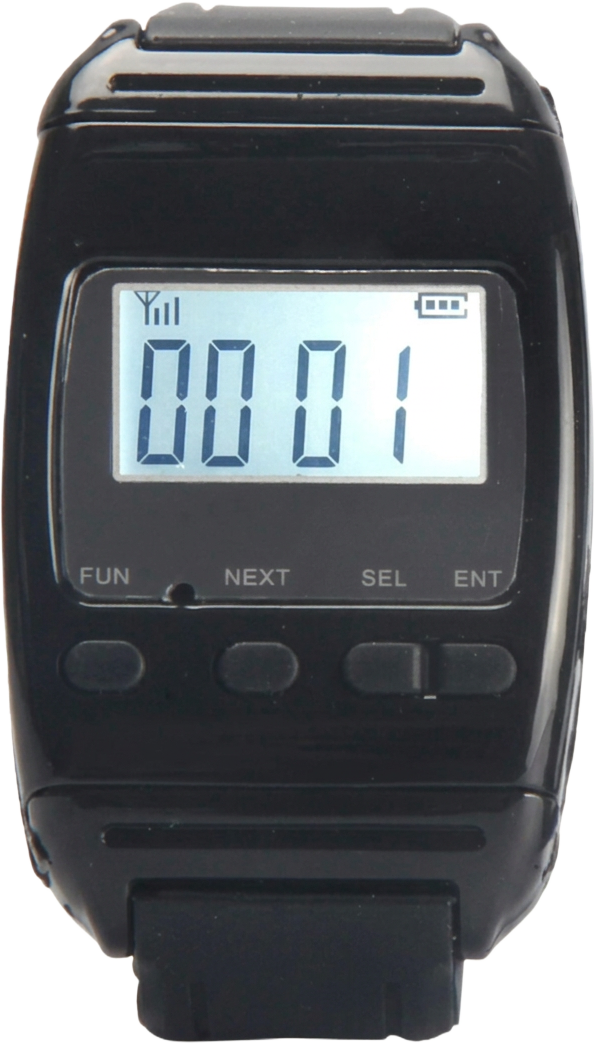
The 4-digit display shows the calling information — from 0000–9999, or with a letter A–F first — so the wearer knows where help is needed.
Supplying wireless calling systems in Africa since 2012
Wireless wristwatch receiver · up to 200 buttons
Keep every call on your wrist. The B-650 Wristwatch Receiver shows who is calling wherever staff are — with up to 200 Call Buttons, beep or vibrate alerts and calls cancelled right from the watch.
When the person responding to calls is not sitting next to a receiver, a call can be raised without anyone knowing it happened — and the waiting starts all over again.
Fixed panels solve distance but not mobility. Staff who move between rooms, floors or tables need the calling information to travel with them — and to be able to clear a call without walking back to a panel.
The B-650 is a wireless Wristwatch Receiver for Nurse Call and Waiter Calling applications. Program up to 200 Call Buttons to it, and it alerts with a beep, a vibration, or both — showing the calling information on its 4-digit display until the call is cancelled with ENT.
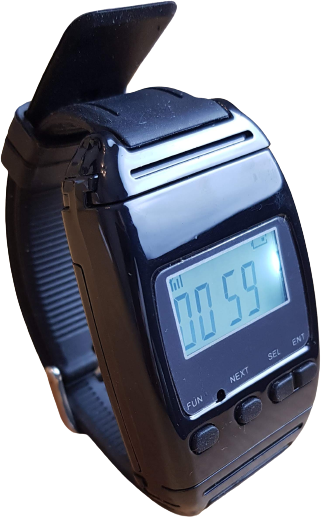
The 4-digit display shows the calling information — from 0000–9999, or with a letter A–F first — so the wearer knows where help is needed.
Set the Wristwatch to beep, vibrate, or beep and vibrate at the same time, so the call gets through even in busy surroundings.
Staff are not tied to a fixed panel. The Wristwatch travels with them, with approximately 150 metres of range — extendable to about a kilometre with repeaters.
No separate Cancel Button is needed: pressing ENT on the Wristwatch clears the call, and the calling information stays visible until it is cancelled.
Any of the up to 200 programmed Call Buttons sends its calling information to the Wristwatch wirelessly.
It beeps, vibrates, or does both at once, and shows the calling information on its 4-digit display.
Press ENT on the Wristwatch to clear the call. The calling information remains displayed until it is cancelled.
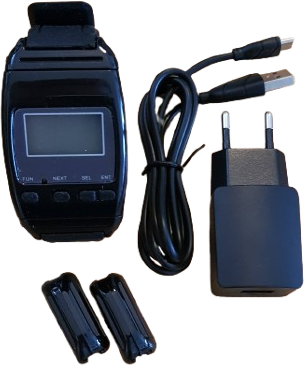
Each B-650 is supplied with a strap to wear on the arm, lanyard adapters for wearing it around the neck, and a Micro-USB charger with plug for the rechargeable battery.
The detailed controls for capacity, alerts, cancelling, wearing and range.
Up to 200 wireless Call Buttons can be programmed to a single B-650 Wristwatch.
A separate Cancel Button is not required when cancelling calls from the Wristwatch. Press ENT on the Wristwatch to clear a call.
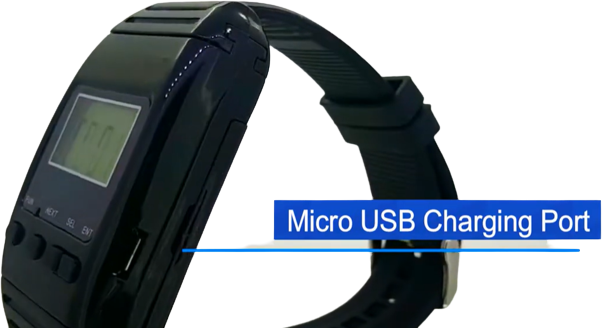
The Wristwatch has a rechargeable battery, charged using a Micro-USB charger. Battery life depends on usage.
Wear it on the arm using the supplied strap, or convert it to a lanyard by removing the straps and fitting the lanyard adapters.
The display can show four numbers from 0000–9999, or a letter as the first character from A–F. For example A001, B125 or F999.
The Wristwatch can be set to beep, vibrate, or beep and vibrate simultaneously. The volume is not adjustable and is set at approximately 85dB.
The Wristwatch provides a single alert. It does not continuously beep to remind the user of an unattended call.
Calling information remains displayed until the call is cancelled by pressing ENT on the Wristwatch.
The Wristwatch displays the signal strength. The standard wireless range is approximately 150 metres, and signal repeaters can extend it to roughly 1 kilometre depending on the installation and surroundings.
The Wristwatch runs on a rechargeable 3.7V Li-ion battery charged with the supplied Micro-USB charger, and can be worn on the arm with the strap or converted to a lanyard.
| Specification | Details |
|---|---|
| Working Voltage | 3.7V Li-ion Battery |
| Working Current | <900mA |
| Frequency | 433.95 MHz |
| Dimensions | 65 × 44 × 19mm |
| Alert Volume | 85dB |
| Warranty | 1 Year |
| Button Capacity | Up to 200 |
Each B-650 Wristwatch is supplied with:
Short answers to the questions we hear most, each with its own video — home use and gaming rooms, straps and lanyards, error codes, alert settings, programming and more. Search or filter below, then press play to watch the video right here.
Everyday use
Press play to watch. The video plays here on the BellMe website.
Watch this video on YouTube: https://www.youtube.com/watch?v=vYVZIepAXgE
Everyday use
Press play to watch. The video plays here on the BellMe website.
Watch this video on YouTube: https://www.youtube.com/watch?v=HdWu53nR8P4
Everyday use
Press play to watch. The video plays here on the BellMe website.
Watch this video on YouTube: https://www.youtube.com/watch?v=N2ix0Y2a5u0
Everyday use
Press play to watch. The video plays here on the BellMe website.
Watch this video on YouTube: https://www.youtube.com/watch?v=tEaoknPNIEo
Troubleshooting
Press play to watch. The video plays here on the BellMe website.
Watch this video on YouTube: https://www.youtube.com/watch?v=-cmdg-aAJj8
Setup and programming
Press play to watch. The video plays here on the BellMe website.
Watch this video on YouTube: https://www.youtube.com/watch?v=WvhimRF-62I
Setup and programming
Press play to watch. The video plays here on the BellMe website.
Watch this video on YouTube: https://www.youtube.com/watch?v=Ti9ev4Xid2I
Setup and programming
Press play to watch. The video plays here on the BellMe website.
Watch this video on YouTube: https://www.youtube.com/watch?v=ttv5krfoXXw
Setup and programming
Press play to watch. The video plays here on the BellMe website.
Watch this video on YouTube: https://www.youtube.com/watch?v=P_Nk-RCR2uY
Setup and programming
Press play to watch. The video plays here on the BellMe website.
Watch this video on YouTube: https://www.youtube.com/watch?v=AcXPgIQnuMA
Everyday use
Press play to watch. The video plays here on the BellMe website.
Watch this video on YouTube: https://www.youtube.com/watch?v=tIufy9f0svY
Tell us where the product will be used and what you need the system to do. A BellMe representative will help with the right configuration.